
SearchExpress records management software lets you manage the entire records lifecycle, including
indexing, retrieving, distributing and archiving your records.
SearchExpress records management software can also identify missing records, which is often required for regulatory compliance.
For paper records, you can scan the documents with SearchExpress, and store the scanned images
in a SearchExpress repository. During the scanning process, you can add index fields, such as Title, Document Type,
and Retention Period. You can also specify a field, such as loan number, to link this record to other records.
SearchExpress records management software can also OCR the document, so you can search the document by content, i.e., by words and phrases in
the document.
For Word, Excel and other digital files, you have several choices.
To create an unalterable copy, you can print the documents and scan them as paper documents.
Or, to save time, SearchExpress records management software lets you convert the documents to TIFF image files, and SearchExpress can automatically import
these TIFF image files. This lets you skip the printing-to-paper and scanning steps while still creating
an unalterable copy of the document.
Or, instead of creating an image of the documents, you can let SearchExpress automatically
index all your Word, Excel and other digital files by the file name and date,
and by the content (text) in the document. When you search and find the document, SearchExpress will display the file
from it's original location, and you can edit the file, if your permission level allows you to.
For physical records, such as books and blueprints, SearchExpress records management software lets you index
the records and type index fields, such as Title, Record Type, and the physical location of the record.
Or, instead of keying index fields, you can use a barcode or RFID, affixed to
the physical record, to specify the Title, physical location and other index fields.
SearchExpress allows you to search up to one billion records,
and find any record in a matter of seconds.
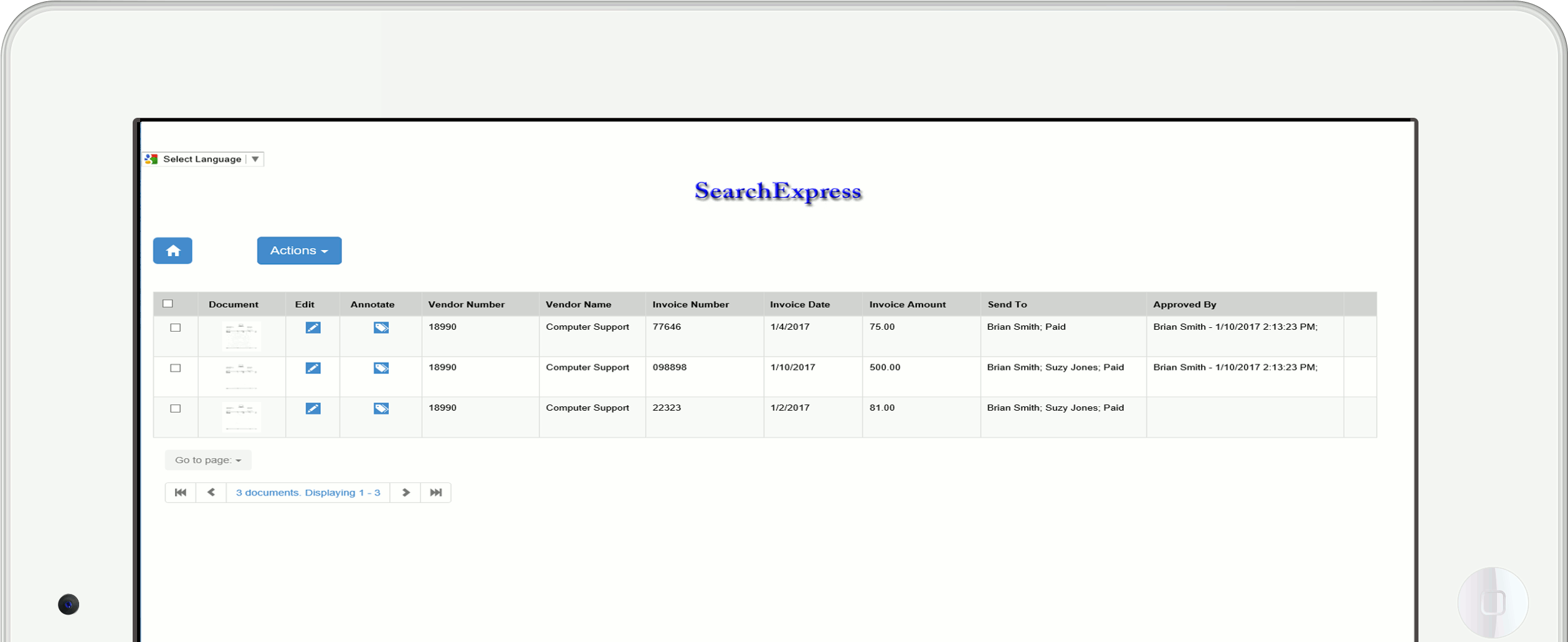
You can make searchable annotations (notes) to documents, and let everyone view your annotations, or
you can specify particular users who can view your annotations. This helps you collaborate with others.
To monitor and control who can add or change documents or other content (such as video), SearchExpress provides document
check-in/check-out and version control via your browser.
You can define a multiple-step workflow so records are routed to different user's "inbaskets" for processing.
SearchExpress provides a number of record-retention features, including:
You can specify document retention rules for scanned documents, Office and other digital documents, and email.
Documents meeting the retention rules can be archived, deleted, or both archived and deleted.
A simple rule could be that all documents of a certain type, e.g., loan applications, are to be deleted after n years.
Or, the rules could be more complicated. For example, approved loan applications could be both deleted and archived after seven years and
rejected loan applications deleted after three years.
You can see a list of all documents that are to be deleted and/or archived, and deselect documents that need to be
retained despite meeting the rules.
Document deletion and archiving is logged to an audit database.
For identifying missing records and related records, which is often necessary for
regulatory compliance, SearchExpress records management software provides the following record-control features:
Related Documents - There are often groups of documents that are related.
For example, for loan documents, there could be an Application, Credit Report, Escrow Agreement, and Appraisal Report.
For A/P invoices, related documents could be the purchase order, receiving report, and cancelled check.
When you are looking at a document, you can click the Related button to see related documents. The related documents could be any
combination of scanned documents, Word or other Office documents, and email.
Missing Documents Report - This shows related documents that are missing or are not in agreement. For example, it could show
that the Appraisal report is missing for one loan and the Escrow Agreement is missing for another loan.
For documents containing dollar amounts, such as invoice amount, or quantities, such as units of product,
the Missing Documents Report shows any related documents in which the total dollar amount or total quantity do not agree.
This report also shows the dollar amount of missing documents.
The Missing Documents report could list any combination of scanned documents, Word or other Office documents, and email.
Grand Totals Report - This shows the grand total dollar amounts or quantities for each document type.
This could show the grand total amount of all loans, the grand total amount of all invoices, or the grand total units in inventory.
The Grand Totals Report sums data from scanned documents, Office documents, and email.
If you want to integrate SearchExpress records management software with your other systems, integration features include:
In addition to searching with your browser, you can also search directly from any software application.
For example, if you are in your customer management software, accounts receivable and payable, human resource,
Microsoft Office, GIS (geographic information system), or email, just highlight a word or
phrase, and press a function key to perform a SearchExpress search and display the scanned documents,
Word, email and other documents containing the search phrase.
When assigning index fields to scanned documents, you can speed data entry by looking up information from SQL or ODBC-compliant databases.
For example, you can enter a Customer Number and use the Lookup button to fill in the customer name and address.
This saves you the time that would be needed to type in the customer name and address, and assures the accuracy of same.
The Lookup function can read any SQL or ODBC-compliant database.
Also, you do not need to use the Lookup button or even look at the scanned document. For example, if you scan a sales invoice, SearchExpress can use the OCR'ed or barcoded invoice number to automatically read the customer name, invoice date, and other invoice data from your sales-invoicing application or any SQL or ODBC-compliant database, without the need to click the Lookup button.
For scanned documents, SearchExpress can also write index fields to ERP and Customer Relationship Management
(CRM) systems or any SQL or ODBC-compliant databases, including Oracle, Microsoft SQL, Postgres, Sybase, MySQL, Access,
Excel, and IBM DB2.
You can use this in a mashup. For example, when scanning you could choose an order number from a pick-list of open orders SearchExpress reads from your CRM system, and then SearchExpress can write the
order number to your ERP system.
Also, when scanning A/P or sales invoices, SearchExpress can write the invoice number to your ERP system,
so you will know that you have a scanned image for each and every invoice in your ERP system.
For regulatory compliance, SearchExpress records management software provides a document access audit module. This is a searchable database which lets you see
each time a document has been viewed, and by whom. This is important
to comply with a growing body of laws and regulations concerning confidentiality
of information you have about your clients and customers, including medical records (HIPAA), and financial records (including Sarbanes-Oxley, SEC, NASD, and IRS).
This can also help you monitor access to proprietary company documents and intellectual property.
SearchExpress is designed for Windows Vista/2003/XP/2000 platforms.
For other features, click here.
Executive Technologies, Inc. has been developing the SearchExpress family
of affordable high-performance document management and records management products since 1984.
SearchExpress lowers the costs of handling and storing your documents, and saves staff time by providing instant access to your documents from other software applications.
If you are scanning documents, imaging is now very affordable. You can store twenty million scanned pages on a $350 one terabyte (trillion byte) hard drive. That's 8,000 pages a day for ten years!
SearchExpress is so easy to install and use that most of our clients
do not need any on-site installation and training. However, we would be
pleased to provide on-site training and consulting, if requested.
We guarantee your satisfaction. We always offer SearchExpress with a 30 day money-back guarantee.
For more information on SearchExpress, please call us at (205) 985-7686 or click here for more information. Our email address is SxSales@searchexpress.com.