Home Benefits Demos Customers Newsletters About Us Contact Us
Proof-Of-Delivery and Sales Invoices at your Fingertips


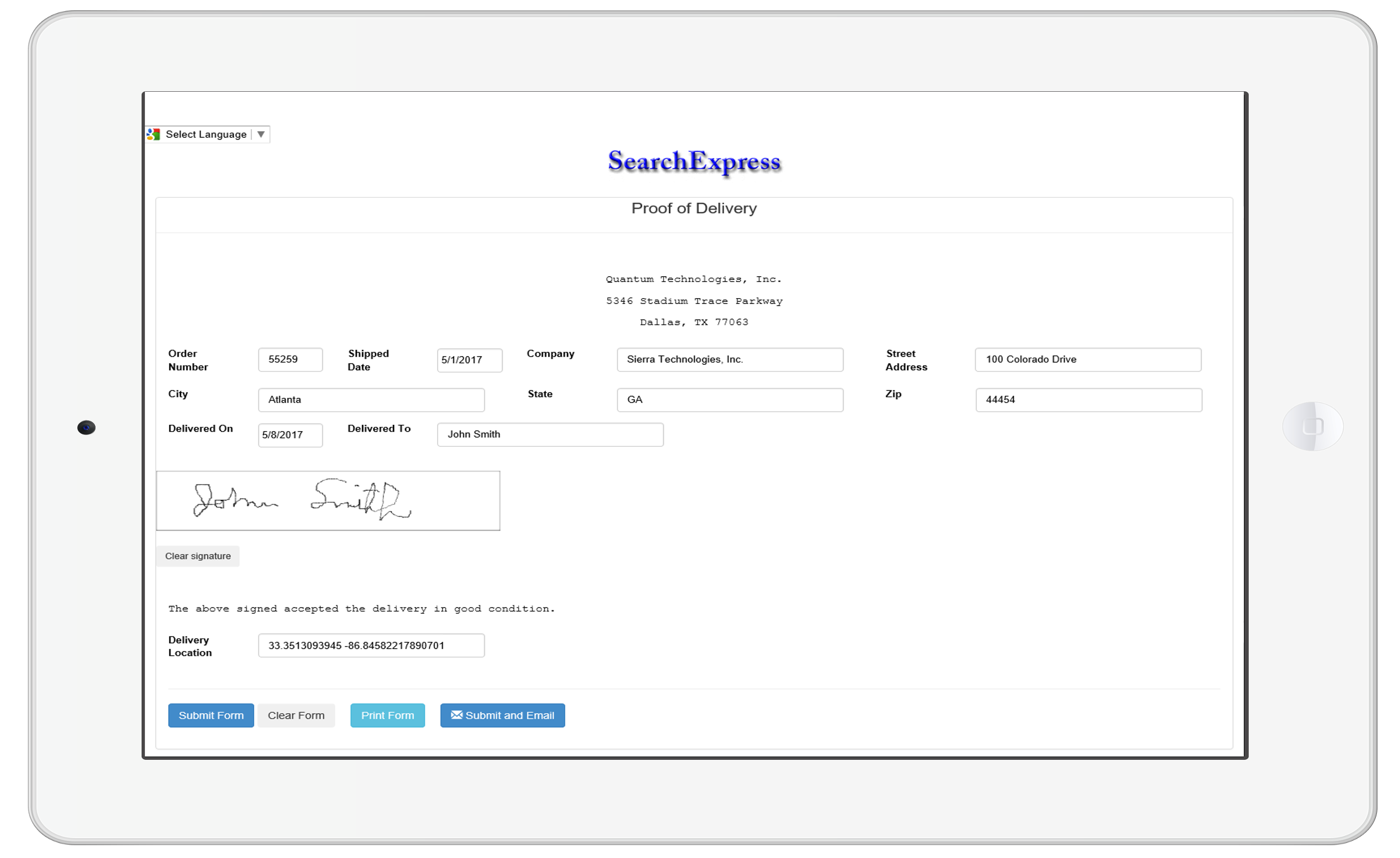
Proving your customers have received the goods and services you delivered is simple when using SearchExpress/POD Document Imaging. With a click of your mouse, you can view, email, or print the signed proof-of-delivery (POD) document proving receipt of goods.

Also, you could let your customers search and view their own POD's, over the Internet.

SearchExpress/POD Document Imaging provides browser-based searching of scanned proof-of-delivery documents, with no manual data entry. No more sifting through filing cabinets and drawers of paper to find what you are looking for.

You can also SearchExpress/POD to scan your Accounts Payable invoices. See SearchExpress/Invoice for a description of A/P scanning, approving and searching.

Here's One Way SearchExpress/POD Document Imaging Can Work:
  • When you first print your delivery documents, you can print a barcode on each document. The barcode contains the invoice number or other unique identifier. Or, instead of using barcodes, you can let SearchExpress OCR (Optical Character Recognition) the invoice.

  • Your customers sign the delivery documents, as proof of delivery of your goods or services.

  • Your Accounts Receivable or Transportation department receives the proof-of-delivery (POD) documents.

  • You use SearchExpress to scan the delivery documents.

  • SearchExpress/POD Document Imaging uses the barcoded invoice number to get the customer name and number, invoice number and date, and other invoice information from your Accounts Receivable invoicing system. Or, you can let SearchExpress OCR the proof-of-delivery invoices.

  • To search for delivery documents, you use your browser and type in the customer name or number, invoice number or date, PRO number, or other invoice information.

  • In addition to searching with your browser, you can also search directly from any software application. For example, if you are in your customer management software, Microsoft Office, email, or ERP software, just highlight the invoice number or customer name, and press a function key to perform a SearchExpress search and display the scanned POD's.

Features and Benefits:
  • Scanning of proof-of-delivery documents.

  • Search/view documents with browser.

  • You can make searchable annotations (notes) to documents, and let everyone view your annotations, or you can specify particular users who can view your annotations. This helps you collaborate with others.

  • In addition to searching from your desktop PC, you can search from your wireless laptop, PDA, cell phone, or handheld computer, such as a Dell Axim Pocket PC. This means you, your delivery people, and optionally your customers can search documents wherever they are, including in a delivery vehicle.

  • Optional scanning of supporting documents such as purchase orders and received checks.

  • SearchExpress can either OCR the invoice, or read the invoice data from your Accounts Receivables system. No costly manual indexing is needed.

  • Quickly search the database on multiple index fields, including invoice number or date, and customer number or name.

  • SearchExpress can use the invoice numbers to name the TIFF or PDF image files.

  • Reduced physical document storage costs.

  • Save time looking for delivery documents.

  • Your customers make a note on the delivery document if there are any shortages or damage. Your customer service department can access the delivery documents and take action immediately.

  • When scanning sales invoices, SearchExpress can write the invoice number to your accounting system, so you will know that you have a scanned image for each and every invoice in your accounting system.

  • You can print reports showing all missing delivery documents. If a driver or carrier misplaces a signed delivery ticket, you find out immediately.

  • Security keeps your confidential data confidential.

  • With the capability to get PODs to customers faster, you can get paid sooner - which can improve your bottom line.

  • Let your customers use their browser to view their own POD's, via the Internet. In a typical scenario, before imaging, when a customer called and requested a copy of a proof-of-delivery document, a clerk would go to the filing cabinets to manually locate the appropriate documents, copy them, send a copy to the client, and then re-file everything. This was both slow and costly. With SearchExpress/POD, your customers can instantly find their own POD's. This provides a faster response for your customers, and saves you money.

In summary, SearchExpress/POD provides new opportunities for improved customer service and reduced costs.

If you give us 30 minutes, we can show you how SearchExpress/POD allows you to easily scan and search your proof-of-delivery documents.

Executive Technologies, Inc. has been developing the SearchExpress family of affordable high-performance document capture and search products since 1984

SearchExpress lowers the costs of handling and storing your invoices and proof-of-delivery documents, and saves staff time by providing instant access to your documents from other software applications.

Document imaging is now very affordable. You can store twenty million scanned pages on a $350 one terabyte (trillion byte) hard drive. That's 8,000 pages a day for ten years!

Good scanners are now also affordable. You can get a 25 page-per-minute (PPM) scanner for less than $1,000, and a 60 PPM scanner for less than $2,000.

SearchExpress is so easy to install and use that most of our clients do not need any on-site installation and training. However, we would be pleased to provide on-site training and consulting, if requested.

We guarantee your satisfaction. We always offer SearchExpress Document Imaging software with a 30 day money-back guarantee.

For more information on SearchExpress Document Imaging software, please call us or click here for more information.

 
  All rights reserved. Copyright 2008, SearchExpress® Phone: (205) 985-7686, SxSales@searchexpress.com